

Howto: Bringing up IREE on a Bare Metal Microcontroller (Part 2)
by Pietra Ferreira

This is part of a blog post series on enabling IREE on bare metal systems. The full series can be found here.
In the first post of this series we introduced IREE, explained why a compiler-based approach suits a microcontroller, and described the four-core CV32E40Pv2 cluster we are using as our target. This post is where the work starts. We build the Verilator model of that cluster, run our first programs on it, and then measure the thing that decides everything else: what it costs to reach memory.
Everything below is reproducible. Every number is one you can generate yourself with the commands given, and we show the command that produced it alongside each result. That matters more than usual here, because most of the interesting figures are not the ones you would guess.
What you need
Two tools, both freely available:
- Verilator, to turn the SystemVerilog RTL into a cycle-accurate C++ model. We used version 5.020, which is what
apt-get install verilatorgave us on an Ubuntu 24.04 base. - The CORE-V GCC toolchain, to compile RISC-V programs for the cluster. We used the OpenHW Group’s
corev-openhw-gccbuild, which is GCC 14.1.0 configured forriscv32-corev-elf.
On Ubuntu, that is:
sudo apt-get install verilator
wget https://buildbot.embecosm.com/job/corev-gcc-ubuntu2204/47/artifact/corev-openhw-gcc-ubuntu2204-20240530.tar.gz
sudo mkdir -p /opt/corev
sudo tar -xzf corev-openhw-gcc-ubuntu2204-20240530.tar.gz -C /opt/corev --strip-components=1
/opt/corev/bin/riscv32-corev-elf-gcc --version
The build expects the toolchain in /opt/corev. If you put it somewhere else, pass TOOLCHAIN_ROOT=/path/to/toolchain on every make command line that builds firmware.
Building the model
The cluster repository carries the CV32E40P RTL as a git submodule, so clone it recursively, on the branch that goes with this post:
git clone --recursive --branch pf-blogpost2 https://github.com/pietraferreira/cv32e40p-verilator-cluster4.git
cd cv32e40p-verilator-cluster4
make verilate
If you already cloned without --recursive, git submodule update --init --recursive fixes it. make verilate runs Verilator over the testbench and the core RTL, then compiles the generated C++ into a simulator binary at build/verilator/obj_dir/Vtb_top_verilator. From clean this took us about 22 seconds and produced roughly 120 MB of build output. You only pay that once; after it, rebuilding and running a program takes a second or two.
That single binary is the whole target. There is no board to wire up, no debugger to attach, and no hardware to source, which is the practical reason we are working this way: anyone reading along can run exactly what we ran.
The first program
The obvious first program is the one that ships with the CV32E40P verification environment: a sanity test that reads the core’s identification CSRs and prints what it finds.
make APP=hello-world runThe APP= variable selects any C file in the sw/ directory. The target compiles it, links it against the board support package, converts the ELF to a hex image, and starts the simulator on it. Here is what came back, abridged:
[TB] loading shared firmware image: build/fw/hello-world.hex
HHHHEEEELLLLLLLLOOOO    WWWWOOOORRRRLLLLDDDD!!!!!!!!!!!!
TTTThhhhiiiissss    iiiissss    tttthhhheeee    OOOOppppeeeennnnHHHHWWWW    GGGGrrrroooouuuupppp    CCCCVVVV33332222EEEE44440000PPPP...
                mmmmiiiissssaaaa                        ====    0000xxxx44440000000000001111111100004444
                XXXXLLLLEEEENNNN    iiiissss    33332222----bbbbiiiittttssss
                SSSSuuuuppppppppoooorrrrtttteeeedddd    IIIInnnnssssttttrrrruuuuccccttttiiiioooonnnnssss    EEEExxxxtttteeeennnnssssiiiioooonnnnssss::::    MMMMIIIICCCC
[TB] CLUSTER EXIT SUCCESS
Every character appears four times. This is not a bug in the simulator, and it is the first thing the platform teaches you: all four cores run main. They come out of reset together and fetch the same startup code from the same boot address. Each sets up its own stack, and then they part ways only briefly: hart 0 prepares the C environment, clearing .bss and running the static constructors, while the other three wait for it to signal that it has finished. Then all four call main, at the same address with the same arguments.
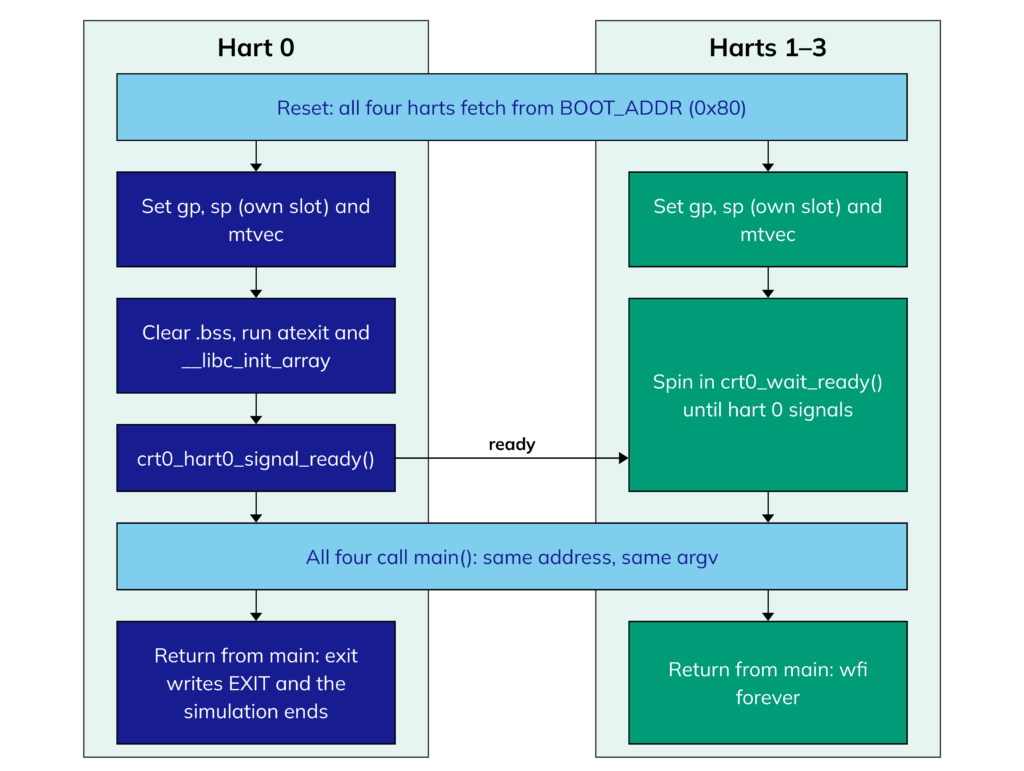
Start-up, from
bsp/crt0.S. Hart 0 initialises; everyone runs main; hart 0 ends the run.From there nothing schedules them. Four cores each printed the banner, one character at a time, into the same memory-mapped output register, and the characters interleaved. The end of the diagram matters too: when hart 0 returns from main the simulation ends, whatever the other three are doing, so any work handed to them has to be finished before it does.
Read past the stutter and the output is genuinely useful, because it is the core describing itself. misa = 0x40001104 decodes as a 32-bit core supporting M (integer multiply and divide), I (the base integer set) and C (compressed instructions). That is rv32imc, exactly as configured. There is no F, so there is no hardware floating point on this build.
A second program makes the four-core behaviour explicit rather than accidental:
$ make APP=core-launch-demo run
cores=4
  hart 0: mhartid=0 sp=0x003fffe0
  hart 1: mhartid=1 sp=0x003fbfe0
  hart 2: mhartid=2 sp=0x003f7fe0
  hart 3: mhartid=3 sp=0x003f3fe0
stack stride=16384 bytes/hart
CORE LAUNCH DEMO PASS
Each core reads its own identity from the mhartid CSR, which is the only thing distinguishing one from another, and reports the stack the startup code gave it: 16 KiB apart, carved out of shared memory by hart number. Collecting the results on one core and printing them there, rather than having all four print, is what keeps this output readable. It is a pattern worth adopting early.
How to hold those cores, hand them work and get results back is the subject of a later post. For the rest of this one we are interested in what a single core sees when it reaches for memory.
The address map
There is no MMU, so the address map is the entire hardware interface. Everything, including the peripherals, is at a fixed address:
| Address | Size | What it is |
|---|---|---|
0x0000_0000 | 64 MB | Shared memory: code and data |
0x1000_0000 | 4 B | Write a byte here and the testbench prints it |
0x1500_1004 | 4 B | Free-running cluster cycle counter |
0x1500_2000 | 4 B | Barrier: write to say “I have arrived” |
0x1500_2040 | 4 B | Barrier: configure how many cores, and which |
0x1500_2080 | 8 B | Barrier: check and clear this core’s event |
0x1500_3000 | 16 B | DMA: source, destination, length, wait |
0x1800_0000 + n × 0x4_0000 | 256 KB each | Scratchpad of core n |
0x2000_0004 | 4 B | Write here to end the simulation |
Two details are worth pulling out, because both shape how software has to be written.
The scratchpads are not aliased. Core 2’s scratchpad lives at 0x1808_0000 for everybody, and there is no “my own scratchpad” address that means something different depending on which core issues it. So a core finds its own fast memory by computing the address from its hart ID. A global variable placed in the scratchpad by the linker would land in core 0’s scratchpad and the other three would reach it the slow way.
The DMA registers are aliased, and in the opposite direction. All four cores write the same four addresses at 0x1500_3000, and each reaches its own engine. Writing the length register is what starts a transfer, so the write order matters: source, destination, then length.
What the memory costs
The repository ships the benchmarks, and each runs in seconds:
make APP=latency-test run    # scratchpad against shared memory
make APP=dma-bench run       # DMA and CPU copies, and a read loop over each memory
latency-test does 200 store/load pairs against each memory and reports spm_cycles=1609 shared_cycles=9807. Over 400 accesses, that is 20.5 extra cycles for every access that leaves the core.
dma-bench is more careful. It reads 128 words from each of the three places a core can read from, and reports not just cycles but retired instructions as well:
| Read loop, 128 words | Cycles | Instructions | Stall cycles | Stall per word |
|---|---|---|---|---|
| Own scratchpad | 653 | 390 | 263 | 2.05 |
| Another core’s scratchpad | 3,232 | 390 | 2,842 | 22.2 |
| Shared memory | 3,233 | 390 | 2,843 | 22.2 |
Subtracting retired instructions from cycles gives the cycles the core spent stalled rather than doing work, and that is the column that characterises the memory rather than the loop around it. It matters because the raw cycle count is misleading: 653 cycles for 128 words looks like five cycles per word, which would make the scratchpad sound slow. It is not. Three of those cycles per word are the loop’s own instructions, and the remaining two are the load-to-use delay of an in-order pipeline. The scratchpad itself answers in a single cycle.
Two conclusions fall out of the table. The first is the headline: going off-core costs about twenty extra cycles per access, every time, and 22.2 minus the 2.05 we just accounted for is 20.1, which is a satisfying confirmation that the model does what it claims.
The second is less obvious and more important: another core’s scratchpad is no faster than shared memory. 22.2 cycles against 22.2. The scratchpads are all addressable from all four cores, which sounds like a shared pool of fast memory, but a remote one goes through the same arbiter and the same delay as main memory does. The fast path is not “scratchpad”, it is “my own scratchpad”. Treat the scratchpad as private fast memory belonging to one core and you will make good decisions; treat it as a shared fast address space and you will be disappointed.
Where the twenty cycles comes from
It is worth being honest about this number, because it is not a property of the core. It is a parameter of the testbench, SHARED_MEM_EXTRA_LATENCY, and the mechanism is a shift register of twenty flip-flops sitting on the data response path. In the model, the memory is simulated as a SystemVerilog array which takes a single cycle to access; the delay is there to emulate real-world memory technologies such as MRAM.
So twenty cycles is a stand-in for a real off-cluster memory rather than a measurement of one, and it is a configurable parameter. Every figure in this post moves with it, and maybe a later post in this series will turn it and see what changes. What does not change is the shape of the problem: there is fast closely coupled memory (“near” memory) and slow main memory (“far” memory), the difference in access speed between them can be large, and software has to be written with that gap in mind.
The DMA engine
The same benchmark copies 512 bytes from shared memory into the core’s own scratchpad, three ways:
| 512-byte copy | Cycles per byte |
|---|---|
| DMA engine | 11.03 |
| CPU loop, one word at a time | 7.03 |
| CPU loop, one byte at a time | 29.03 |
The DMA is slower than a simple CPU copy loop, which surprised me. The reason is that it pays the twenty-cycle crossing twice, once to read and once to write, even when the destination is the scratchpad belonging to the very core that programmed it: its writes go out through the crossbar rather than down the local path the CPU would use.
That does not make it useless, but it does change why you would reach for it. The CPU loop costs 7 cycles per byte of the core’s time. The DMA costs 11 cycles per byte of elapsed time and almost none of the core’s: the benchmark shows the core retiring 9 instructions for the entire transfer. The value of the DMA is that the core is free while it runs, which is what makes it possible to fetch the next tile of a tensor while computing on the current one.
The byte-at-a-time row is a reminder to keep buffers aligned. The engine moves a whole word per round trip when source and destination are both 4-byte aligned, and falls back to a byte per round trip when they are not, which costs four times as much.
What this means: stage your data
A factor of twenty between near and far memory is exactly the gap that tiling exists to close, and it is the reason a compiler-based framework like IREE is interesting on this hardware. Cut the tensors into tiles small enough to fit in a scratchpad, move each tile in with the DMA, compute on it out of fast memory, and write the result back.
But staging is not free. You pay one copy in and one copy out, and you only get that back on the accesses that follow. So when does it pay? I wrote a benchmark to find out rather than guess. Each of the four cores stages a 128-word tile into its own scratchpad, sweeps over it a number of times, and writes it back, with the DMA transfers included in the timing. The same kernel run directly out of shared memory is the baseline:
| Sweeps over the tile | In shared memory | Staged in scratchpad | Speed-up |
|---|---|---|---|
| 1 | 45,053 | 49,636 | staging loses |
| 2 | 67,584 | 53,228 | 1.27× |
| 4 | 112,637 | 59,464 | 1.89× |
| 8 | 202,749 | 73,903 | 2.74× |
The demo defaults to eight sweeps. To reproduce another row, set PASSES, deleting the object file first because changing APP_CFLAGS does not trigger a rebuild on its own:
rm -f build/fw/l1-staging-demo.o
make APP=l1-staging-demo run APP_CFLAGS=-DPASSES=2u
Delete it again before going back to the default, or the next run will reuse the last PASSES you set.
The crossover sits between one sweep and two. Touch your data exactly once and staging costs you; touch it twice and you are already ahead; touch it eight times and you are nearly three times faster. Since almost every interesting tensor operation revisits its operands (a matrix multiplication reads each input row and column many times over), this is a strong argument for tiling into the scratchpad, and a precise statement of what the compiler has to achieve to be worth using.
Try it yourself
Every number above came from one of these:
make verilate                    # build the simulator (once)
make APP=hello-world run         # core identification CSRs
make APP=core-launch-demo run    # what the four cores are doing at start-up
make APP=latency-test run        # scratchpad against shared memory
make APP=dma-bench run           # copies and read loops over each memory
make APP=l1-staging-demo run     # when staging into the scratchpad pays
Useful extras: MAXCYCLES= raises the simulation’s cycle limit for long runs, and SIM_ARGS=+dma_trace logs every read and write the DMA engine issues, with a cycle stamp, which is the quickest way to see whether a transfer took the fast aligned path or the slow one.
One trap if you start taking your own measurements. The mcycle counter is a core counter, and the core’s clock is gated while it waits, so any interval that spans a wait between cores will only count the cycles that core was awake; we have seen a wait of 147,000 cycles report itself as a few hundred. For anything spanning more than one core, use the free-running cluster counter at 0x1500_1004 instead.
Next
We now have a model we can build, programs we can run on it, and a clear picture of what memory costs: twenty cycles to go off-core, and a crossover at two sweeps for staging data into the scratchpad. That is the ground everything else in this series stands on. In the posts that follow, we start building on it, working towards getting IREE itself running on the cluster.